
Improving the Google PageSpeed Insights score on a WordPress site with Divi
A website’s load speed is no longer a simple matter of comfort: today it is a decisive factor for organic search (SEO), user experience and conversion. Yet many WordPress sites using the Divi theme still suffer from poor performance, particularly on mobile.
In this article I explain how to improve your Google PageSpeed Insights score effectively, from a real case, with a clear, concrete method you can apply straight away.
Why Google PageSpeed Insights has become unavoidable
The Google PageSpeed Insights tool assesses a website’s performance against several technical criteria that Google uses to rank pages in its search results.
In particular it analyses:
- Real load speed
- The Core Web Vitals (LCP, CLS, INP)
- Behaviour on mobile
- JavaScript and CSS blocking
- Image optimisation
A poor score has direct consequences:
- A fall in SEO traffic
- A higher bounce rate
- Lost conversions
- Damage to the brand image
Why WordPress sites with Divi are often slow
The CMS WordPress is extremely powerful and flexible, but that richness can become a drag if the site is not properly optimised. The Divitheme is highly visual but also heavy by nature :
- Heavy script loading
- Multiple animations
- Complex modules
- Large stylesheets
Without advanced configuration, a Divi site can easily score below 50 on PageSpeed Insights, especially on mobile.
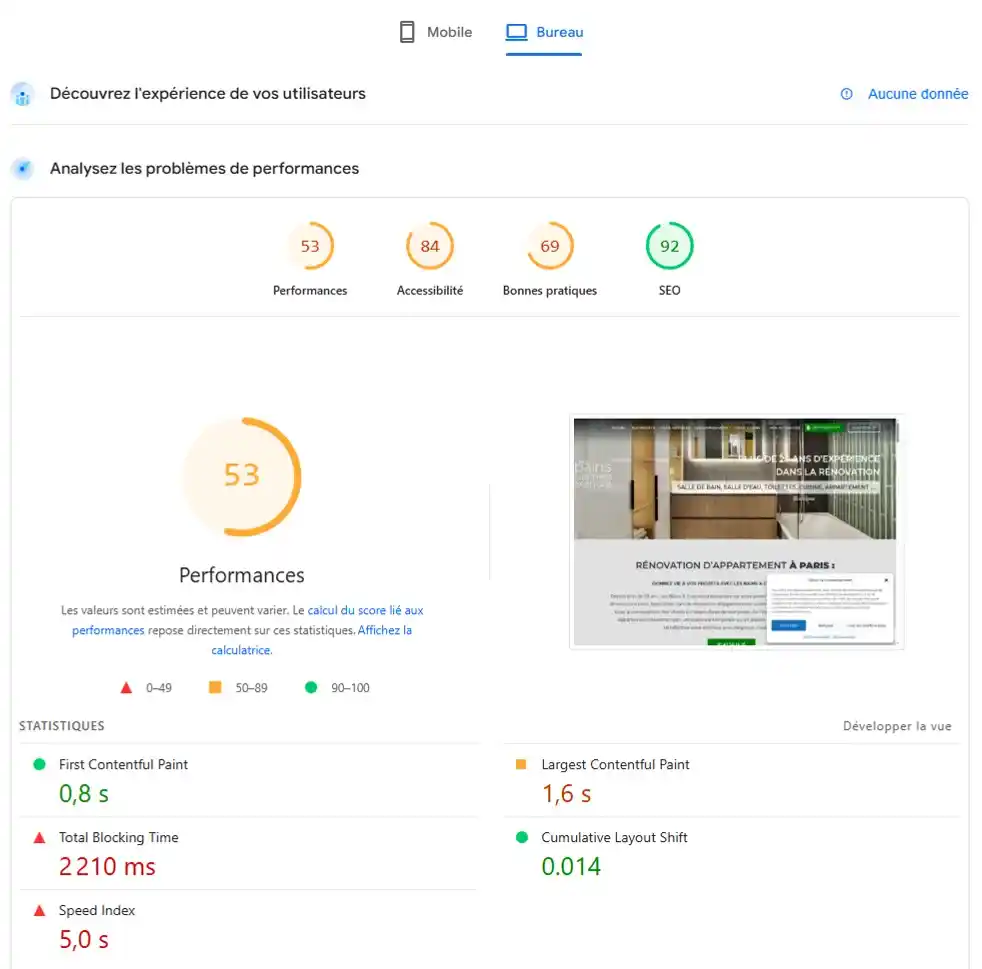
A real case: performance BEFORE optimisation (desktop)
Before any work, the site’s desktop performance was limited.
The Google PageSpeed Insights analysis in Desktop mode showed the following:
- Desktop performance score: 53
- First Contentful Paint (FCP): 0.8 s
- Largest Contentful Paint (LCP): 1.6 s
- Total Blocking Time (TBT): 2,210 ms
- Speed Index: 5.0 s
- Cumulative Layout Shift (CLS): 0.014
These figures show that the initial render was not catastrophic, but that the browser spent a great deal of time blocked by scripts (a very high TBT), which degraded how smooth and responsive the page felt even on desktop.
Step 1: Technical clean-up of the WordPress site
Before even talking about caching or images, you have to:
- Remove unnecessary plugins
- Clean up the media library
- Delete unused themes
- Check for scripts loading for no reason
- Back your site up through FTP + database, or with the free Updraft Plus plugin

For that you can use the free plugin Media Hygiene. Every active plugin adds to server response time and browser rendering.
The aim: lighten the foundations before optimising performance.
Step 2: Image optimisation (the biggest performance gain)
Images often represent 60 to 80% of a web page’s total weight. Imagify offers a free tier that lets you optimise 20 MB of images a month (roughly 200 images)
What to do:
- Automatic compression
- Conversion to WebP
- Resizing to the exact dimensions
- Lazy loading for off-screen images

The direct result:
- A massive gain on Largest Contentful Paint (LCP)
- A better mobile score first and foremost
Step 3: Caching and preloading resources
One of the best-performing caching systems with WordPress and Divi is WP Rocket, which costs around 30 € a year. You can use the free alternative WP Fastest Cache, which will be a little less effective. A good cache configuration lets you:
- Cut load time dramatically
- Reduce server load
- Speed up display for returning visitors
The key elements:
- Browser cache
- Server cache
- Font preloading
- CSS / JS minification

On WordPress this step is absolutely essential if you want scores above 80-90.
Step 4: Divi-specific performance settings
Divi includes several built-in optimisation options that are often overlooked:
- Dynamic module loading
- Deferred JavaScript loading
- Asynchronous CSS generation
- Turning off unnecessary animations

These settings reduce the weight of the DOM and significantly improve visual rendering.
Step 5: Checking the Core Web Vitals
After optimisation we checked the following indicators:
- LCP (Largest Contentful Paint) < 2 s ✅
- CLS (Cumulative Layout Shift) < 0.1 ✅
- INP (Interaction to Next Paint) < 200 ms ✅
These metrics are now built directly into Google’s algorithm.
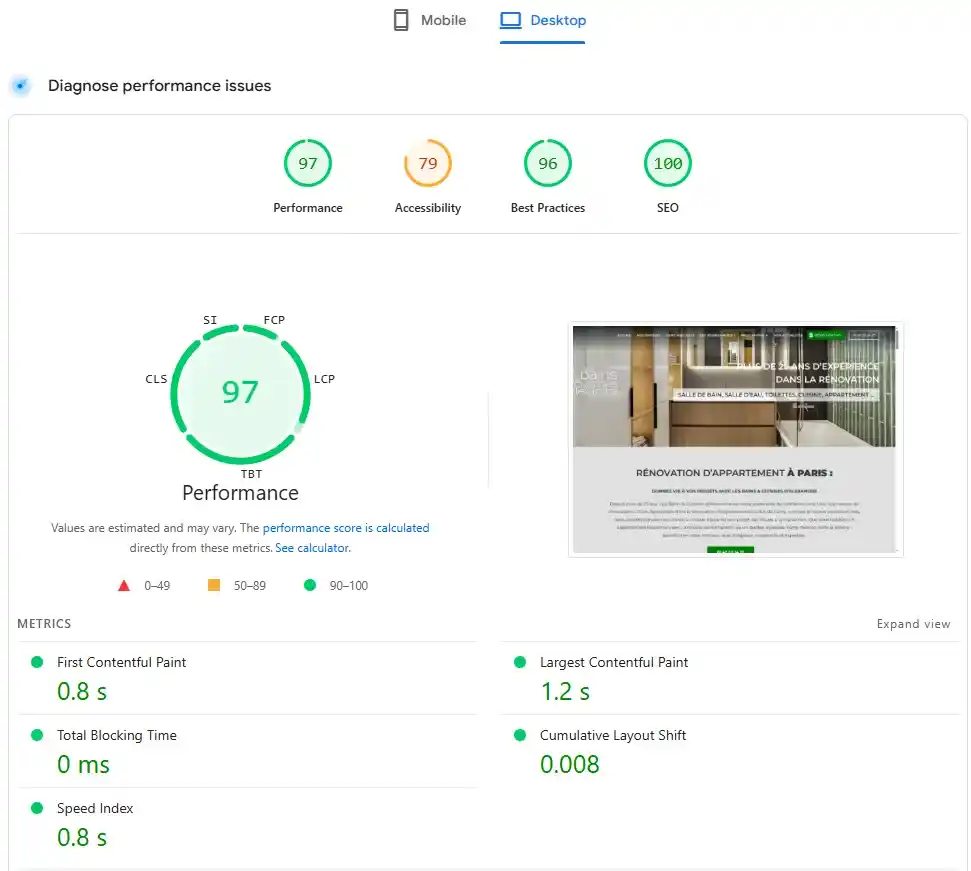
The results after optimisation
After the technical optimisation of the WordPress site using Divi, we ran another PageSpeed Insights test in Desktopmode. The results are markedly better:
- Desktop performance score: 97
- First Contentful Paint (FCP): 0.8 s
- Largest Contentful Paint (LCP): 1.2 s
- Total Blocking Time (TBT): 0 ms
- Speed Index: 0.8 s
- Cumulative Layout Shift (CLS): 0.008
- SEO: 100 / 100
In concrete terms, that means:
- The browser no longer spends time blocked by JavaScript (TBT at 0 ms)
- The main content appears very quickly
- The page is visually stable while it loads
- The site fully meets Google’s expectations on desktop performance.
The direct impact on organic search (SEO)
A faster site means:
- Better indexing
- Better positions in the results
- A better click-through rate
- More time spent on the site
- A better conversion rate
Technical performance is now a pillar of modern SEO.

Should you aim for 100/100 on PageSpeed Insights?
Reaching 100/100 is possible in some cases, but it is not always necessary or cost-effective. The real objective is:
- To be above the Core Web Vitals thresholds
- To offer a smooth mobile experience
- To avoid algorithmic penalties
A score between 85 and 95 is already excellent in 95% of projects.
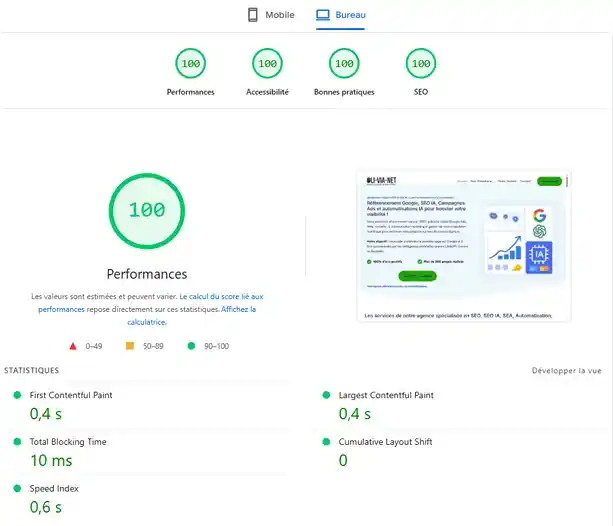
An example: our own agency site’s score Oli-via-net.fr
Conclusion:
Optimising the performance of a WordPress site with Divi is not optional, it is an absolute necessity if you want to stay visible, competitive and profitable online.
With a structured method:
- Clean-up
- Image optimisation
- Caching
- Divi settings
- Checking the Core Web Vitals
it is entirely possible to get excellent scores on Google PageSpeed Insights, even with a site that started out slow.
Written by
Nicolas Peter – Performance Web and SEO expert in Perpignan and Paris
Oli-via-net agency